

How We Choose the Products We Recommend
We don’t have a warehouse full of gear to physically put through its paces — what we do instead is disciplined research. For every guide, we start with the manufacturer’s published specifications and compare them directly against competing models in the same price range. We track real, current pricing across retailers, not list prices that never actually apply, so the numbers in our comparisons reflect what you’d actually pay today. And we read, in bulk, through verified customer reviews and independent expert coverage for each product, looking for recurring complaints, common praise, and the patterns a single glossy product page won’t tell you.
Where we’ve personally bought and used a product ourselves — currently true for many of the kitchen items we cover — we say so directly in the review, and that firsthand experience shapes what we highlight. For everything else, our pros-and-cons calls come from that cross-referenced research process, not a single source or a rewritten spec sheet. We revisit guides periodically as prices shift and new models launch, and we link to multiple retailers where possible so you’re not stuck with just one option.

Ugo Daniel researches, compares, and writes the buying guides on Wallstores, cross-checking manufacturer specs, verified pricing, and real customer feedback across tech, home, fitness, and pet categories. He’s personally bought and used many of the kitchen appliances featured on the site, and draws on that firsthand experience in those reviews.
Last updated: September 2026
Affiliate disclosure: WallStores is a participant in the Amazon Services LLC Associates Program. As an Amazon Associate, we earn from qualifying purchases made through links on this page, at no extra cost to you.
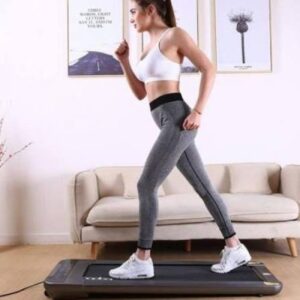
Walking pads have gone from a niche home-office gadget to one of the fastest-growing ways people are sneaking movement into a desk job. Unlike a full treadmill, a walking pad is low-profile enough to slide under a standing desk, quiet enough for video calls, and simple enough to start with a remote click instead of a console full of settings. We compared five of the most consistently recommended models across speed range, incline, weight capacity, and noise to help you find the right one for your space and your workday.
Quick Comparison
| Product | Best For | Speed Range | Weight Capacity | |
|---|---|---|---|---|
| DeerRun Under Desk Walking Pad | Best Overall | 0.6–3.8 mph | 300 lbs | See Price on Amazon → |
| WalkingPad Z1 Foldable | Best Foldable / Compact | Up to ~3.7 mph | Manufacturer-rated | See Price on Amazon → |
| ACEZOE Walking Pad with Auto Incline | Best with Handlebar & App | Up to 8 km/h (~5 mph) | Manufacturer-rated | See Price on Amazon → |
| WALKINGPAD C2 | Best Budget / Ultra-Slim | 0.5–3.72 mph | Manufacturer-rated | See Price on Amazon → |
| Sunny Health & Fitness Asuna TreadPad Slim | Best from an Established Fitness Brand | Manufacturer-rated | Manufacturer-rated | See Price on Amazon → |
1. DeerRun Under Desk Walking Pad — Best Overall
 This is the pick that shows up as a top recommendation across multiple independent testers, largely because it’s one of the few walking pads in this price range that includes a manual incline (about 6%), which adds real calorie burn without adding speed. At 300 lbs, it also has the highest weight capacity of the group, and app plus remote control means you can start, stop, and check your step count without breaking stride. On Amazon, it holds a 4.0-star average from 252 reviews.
Pros: manual incline option, highest weight capacity here, app and remote control, no-assembly setup.
Cons: incline is manual (you set it, it doesn’t auto-adjust), and like most walking pads it’s a flat belt with no side rails or console for balance.
2. WalkingPad Z1 Foldable — Best Foldable / Compact
 WalkingPad’s name is practically synonymous with the category, and the Z1 is built around its signature 180° fold, which lets it stand upright in a closet or against a wall rather than sliding flat under furniture. If floor space (not under-desk clearance) is your real constraint, this is the one built specifically to solve that. On Amazon, it holds a 4.1-star average from 194 reviews.
Pros: genuinely compact when folded, quiet motor, simple LED display for at-a-glance stats.
Cons: no incline, and the top speed is more suited to a brisk walk than a jog.
3. ACEZOE Walking Pad with Auto Incline — Best with Handlebar & App
 This ACEZOE walking pad is the pick for anyone who wants the option of a light jog, not just a walk — its top speed of roughly 7.6 mph (about 12 km/h) is the highest in this lineup. It also adds up to 15% auto incline across 9 levels, something none of the other picks here offer, and it comes with a companion app and remote control for adjusting speed and incline on the fly. On Amazon, it holds a 4.7-star average from 215 reviews.
Pros: highest top speed here, auto incline up to 15%, app tracking, remote control.
Cons: larger footprint than a pure walking pad, and it’s a heavier unit to move around.
4. WALKINGPAD C2 — Best Budget / Ultra-Slim
 The C2 strips things down to the essentials: an ultra-slim deck, tool-free setup, and Smart FootSense control that starts and adjusts speed based on your stride rather than requiring constant remote taps. It’s consistently the most affordable way into the WalkingPad ecosystem, making it a sensible first walking pad if you’re not sure how much you’ll actually use one. On Amazon, it holds a 4.4-star average from 206 reviews.
Pros: most budget-friendly option here, ultra-slim profile, no-assembly setup, automatic stride-based speed control.
Cons: lower top speed than the Task 2.0, and no incline.
5. Sunny Health & Fitness Asuna TreadPad Slim — Best from an Established Fitness Brand
 Sunny Health & Fitness has been making home exercise equipment for years, and this Wi-Fi Treadpad brings that longer track record (and easier-to-find customer support and replacement parts) to the walking pad category. It keeps the same low-profile, slide-under-a-desk design as the rest of this list, and adds its own SunnyFit app with WiFi connectivity for buyers who’d rather buy from a brand they already recognize. On Amazon, it holds a 4.2-star average from 158 reviews.
Pros: established brand with a longer support history, low-profile slim design, WiFi-connected SunnyFit app.
Cons: lower top speed (3.7 mph) than the WalkingPad or ACEZOE models.
How to Choose a Walking Pad
Speed range: most desk-walking happens at 1–2.5 mph — anything faster is a bonus for post-work cardio, not a requirement. Incline: even a small incline meaningfully increases calorie burn at the same speed, so it’s worth prioritizing if you plan to use the pad daily rather than occasionally. Weight capacity: check this against your own weight with margin, the same way you would with any piece of exercise equipment. Noise level: if you’re on calls most of the day, a quieter motor matters more than top speed — user reviews are usually more reliable here than spec sheets. Storage: a folding design like the Z1 or C2 matters most in smaller apartments; if you have permanent under-desk clearance, a non-folding model isn’t a downside.
FAQ
Are walking pads actually worth it for desk workers? For most people, yes — the appeal isn’t intensity, it’s that “some walking” is easy to sustain daily when it costs zero extra time, unlike a gym trip.
Can I run on a walking pad? Only the higher-speed models like the ACEZOE walking pad are really built for a jog; most walking pads are designed and rated for walking speeds only — check the manufacturer’s specific speed rating before attempting to run.
Do I need a desk converter or standing desk to use one? Not necessarily — many people use a walking pad with a regular desk at sitting height by using a laptop stand, though a height-adjustable desk makes the ergonomics considerably better.
How loud are these? Quality walking pads are designed to be call-friendly, generally in the range of a quiet conversation, but motor noise does vary by model and increases somewhat at higher speeds.
Affiliate disclosure: As an Amazon Associate, WallStores earns from qualifying purchases. Prices and availability shown on Amazon at the time of your visit — click through for current pricing.
Related Guides
Ugo Daniel researches, compares, and writes the buying guides on Wallstores, cross-checking manufacturer specs, verified pricing, and real customer feedback across tech, home, fitness, and pet categories. He’s personally bought and used many of the kitchen appliances featured on the site, and draws on that firsthand experience in those reviews.