
Disclosure: Wallstores is reader-supported. As an Amazon Associate, we earn from qualifying purchases made through links on this page, at no extra cost to you. Learn more.
How We Choose the Products We Recommend
We don’t have a warehouse full of gear to physically put through its paces — what we do instead is disciplined research. For every guide, we start with the manufacturer’s published specifications and compare them directly against competing models in the same price range. We track real, current pricing across retailers, not list prices that never actually apply, so the numbers in our comparisons reflect what you’d actually pay today. And we read, in bulk, through verified customer reviews and independent expert coverage for each product, looking for recurring complaints, common praise, and the patterns a single glossy product page won’t tell you.
Where we’ve personally bought and used a product ourselves — currently true for many of the kitchen items we cover — we say so directly in the review, and that firsthand experience shapes what we highlight. For everything else, our pros-and-cons calls come from that cross-referenced research process, not a single source or a rewritten spec sheet. We revisit guides periodically as prices shift and new models launch, and we link to multiple retailers where possible so you’re not stuck with just one option.

Ugo Daniel researches, compares, and writes the buying guides on Wallstores, cross-checking manufacturer specs, verified pricing, and real customer feedback across tech, home, fitness, and pet categories. He’s personally bought and used many of the kitchen appliances featured on the site, and draws on that firsthand experience in those reviews.
Last updated: September 2026 · Written by Ugo Daniel, founder of Wallstores

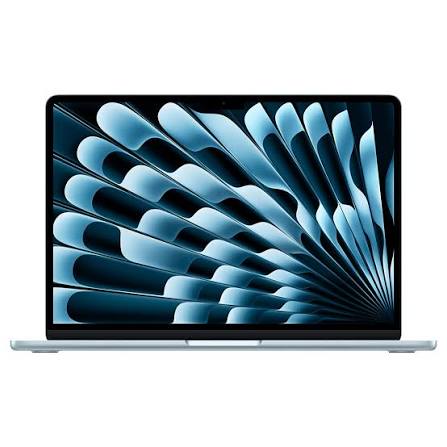
The 2025 MacBook Air 13-inch (M4) is the best-selling, most-reviewed MacBook on Amazon, with nearly 5,800 verified ratings holding a 4.8-star average — the highest rating of any current MacBook, including the newer M5 models. At $999, it’s also the cheapest current MacBook. We looked at its specs, real buyer feedback, and how it holds up against Apple’s newer M5 refresh and the MacBook Pro line to see whether it’s still the smart default in 2026.
How we research this review: the price, rating, and review count below come directly from the product’s live Amazon listing at the time of writing, cross-checked against Apple’s own published specs. We don’t accept free review units, and we haven’t tested this unit ourselves — this review is built from verified specs and aggregated real buyer feedback, not hands-on testing.
Why We Selected It
With nearly 5,800 verified ratings, this MacBook has a review base far deeper than any other current model, including the newer M5-equipped Airs (which top out around 1,100 ratings) and the MacBook Pro (305 ratings). Combined with the highest star rating in the lineup, it’s the most-proven MacBook Apple currently sells.
Who It’s For
This MacBook is built for students, everyday users, and professionals whose work is mostly browsing, writing, spreadsheets, video calls, and light photo editing. Its fanless design means it runs completely silently, and Apple’s M4 chip comfortably handles all of that plus moderate multitasking.
Who Should Avoid It
Skip it if your work involves sustained video editing, 3D rendering, large compiles, or other tasks that tax the CPU/GPU for extended periods — without a fan, the Air will throttle under prolonged heavy load. Look at the MacBook Pro instead for that kind of work.
Pros
Highest rating of any current MacBook (4.8/5), Deepest verified review base by a wide margin, Fanless, completely silent operation, All-day battery life, Cheapest current MacBook.
Cons
Base 256GB SSD fills up quickly with apps and media, No active cooling means it throttles under sustained heavy loads, Only 16GB unified memory on this configuration, Standard Liquid Retina display, not XDR.
Important Specifications
| Chip | M4 |
| Display | 13.6-inch Liquid Retina |
| Memory | 16GB unified |
| Storage | 256GB SSD |
| Camera | 12MP Center Stage |
| Price | $999.00 |
| Rating | 4.8/5 (5,812 ratings) |
How It Compares With Alternatives
Against the newer MacBook Air 13″ (M5) ($1,234), this M4 model is over $200 cheaper while delivering nearly identical everyday performance — the M5’s gains matter most for buyers chasing the newest silicon rather than a practical speed difference. Against the MacBook Air 15″ (M5) ($1,399), this model is smaller and much cheaper, though the 15-inch offers more screen space. Against the MacBook Pro 14″ (M5) ($1,839), this Air costs 84% less but lacks active cooling for sustained heavy workloads. See our full Best MacBook for Every Budget roundup for the complete lineup.
What Type of Buyer Should Choose It
Choose this MacBook Air if you want the most-proven, most-reviewed MacBook available and your daily work is browsing, writing, spreadsheets, and light creative tasks rather than sustained heavy compute. It’s also the safest first-Mac purchase for students or anyone switching from Windows.
Living With It Day to Day
The Air’s biggest everyday strength is how little you have to think about it. There’s no fan, so it’s silent in a library or a late-night meeting. Apple rates its battery for up to 18 hours of video playback, so most people charge it overnight rather than carrying the charger. It wakes instantly, and the 12MP Center Stage camera keeps you framed on video calls as you move.
The M4 Air also supports two external displays while the laptop’s own screen stays on, which is useful if you plug into a desk setup at home or work.
Choosing the Right Configuration
- Memory: 16GB is the right amount for most people, and it’s the base configuration here.
- Storage: 256GB is the most common regret. If you keep photos, video projects or large apps locally, choose 512GB. You can’t add storage later.
- Size: if you work on spreadsheets or side-by-side windows all day, consider the 15-inch Air for the extra screen space.
Limitations in Practice
- Long video exports or large code builds slow down after several minutes as the chip throttles to stay cool.
- Gaming is limited to Mac-native titles and lighter games. It isn’t a replacement for a gaming laptop.
- Windows can’t be installed directly. Windows apps run only through virtualization software, and some, especially games, won’t run at all.
- Only two USB-C ports, so many people add a small USB-C hub for drives, SD cards or HDMI.
Frequently Asked Questions
Is the M4 MacBook Air good for college?
Yes. It’s light, silent, lasts all day on battery and handles writing, research, presentations and light creative work. Apple’s education pricing can lower the cost further.
Should I wait for, or pay more for, the M5 Air?
For everyday tasks, the performance difference is small. The M4 model is the better value unless you want the newest chip or plan to keep the laptop for a very long time.
Does it get hot?
It gets warm under heavy load but stays comfortable for normal use. Because there’s no fan, it manages heat by lowering performance instead of getting louder.
What to Consider Before Buying
If you store a lot of large files, apps, or offline media locally, consider stepping up from the base 256GB SSD, since storage can’t be upgraded later. If your work occasionally involves longer video exports or heavier multitasking, weigh whether the newer M5 Air or a MacBook Pro’s active cooling would serve you better long-term. Otherwise, for typical everyday computing, this remains the most cost-effective, best-proven MacBook Apple sells.
Related Guides
Ugo Daniel researches, compares, and writes the buying guides on Wallstores, cross-checking manufacturer specs, verified pricing, and real customer feedback across tech, home, fitness, and pet categories. He’s personally bought and used many of the kitchen appliances featured on the site, and draws on that firsthand experience in those reviews.