

How We Choose the Products We Recommend
We don’t have a warehouse full of gear to physically put through its paces — what we do instead is disciplined research. For every guide, we start with the manufacturer’s published specifications and compare them directly against competing models in the same price range. We track real, current pricing across retailers, not list prices that never actually apply, so the numbers in our comparisons reflect what you’d actually pay today. And we read, in bulk, through verified customer reviews and independent expert coverage for each product, looking for recurring complaints, common praise, and the patterns a single glossy product page won’t tell you.
Where we’ve personally bought and used a product ourselves — currently true for many of the kitchen items we cover — we say so directly in the review, and that firsthand experience shapes what we highlight. For everything else, our pros-and-cons calls come from that cross-referenced research process, not a single source or a rewritten spec sheet. We revisit guides periodically as prices shift and new models launch, and we link to multiple retailers where possible so you’re not stuck with just one option.

Ugo Daniel researches, compares, and writes the buying guides on Wallstores, cross-checking manufacturer specs, verified pricing, and real customer feedback across tech, home, fitness, and pet categories. He’s personally bought and used many of the kitchen appliances featured on the site, and draws on that firsthand experience in those reviews.
Last updated: September 2026 · Written by Ugo Daniel, founder of Wallstores
Apple currently sells MacBooks spanning from a $999 fanless Air to a $2,800+ MacBook Pro with a Pro-tier chip, and the right pick depends on whether your work actually taxes the CPU/GPU for extended periods or not. We compared five current MacBooks — two chip generations of Air, both screen sizes, and two Pro tiers — looking at real specs, verified Amazon ratings, and who each one genuinely makes sense for.
How we research this guide: every price, rating, and review count below comes directly from each product’s live Amazon listing at the time of writing, cross-checked against Apple’s own published specs. We don’t accept free review units from these brands, and we don’t claim to have tested each unit ourselves — this is a comparison of verified specs and real buyer feedback, not a hands-on test.
Quick Comparison
| Product | Best For | Price | Rating | |
|---|---|---|---|---|
| Apple 2025 MacBook Air 13-inch (M4), 16GB/256GB, Silver | Best Overall / Best Value | $999.00 | 4.8/5 (5,812) | See Price on Amazon → |
| Apple 2026 MacBook Air 13-inch (M5), 16GB/512GB, Midnight | Best Latest Chip | $1,234.00 | 4.7/5 (1,100) | See Price on Amazon → |
| Apple 2026 MacBook Air 15-inch (M5), 16GB/512GB, Midnight | Best Large Screen | $1,399.00 | 4.7/5 (673) | See Price on Amazon → |
| Apple 2025 MacBook Pro 14-inch (M5), 16GB/1TB, Space Black | Best for Pro Work | $1,839.00 | 4.7/5 (305) | See Price on Amazon → |
| Apple 2026 MacBook Pro 16-inch (M5 Pro), 24GB/1TB, Space Black | Best for Power Users | $2,814.00 | 4.7/5 (138) | See Price on Amazon → |
1. Apple 2025 MacBook Air 13-inch (M4), 16GB/256GB, Silver — Best Overall / Best Value

Why we selected it: It’s the best-selling, most-reviewed MacBook on Amazon by a wide margin, with nearly 5,800 verified ratings at a 4.8-star average — the highest rating of any model in this list.
Who it’s for: Students, everyday users, and anyone who wants a fast, silent, all-day-battery laptop for browsing, office work, and streaming.
Who should avoid it: Video editors, 3D artists, or anyone running sustained heavy workloads — the Air has no fan, so it throttles under prolonged intense load.
Pros: Highest rating and deepest review base of any model here, Fanless silent operation, All-day battery life, M4 chip handles everyday tasks and light creative work easily.
Cons: Base 256GB SSD fills up fast, No active cooling means it throttles under sustained heavy loads, Only 16GB unified memory on this configuration.
Important specs: M4 chip · 13.6-inch Liquid Retina display · 16GB unified memory · 256GB SSD · 12MP Center Stage camera.
What type of buyer should choose it: The default pick for most MacBook shoppers — if you’re not sure which MacBook to buy, this is the safest, most-proven option.
2. Apple 2026 MacBook Air 13-inch (M5), 16GB/512GB, Midnight — Best Latest Chip
Why we selected it: It’s the newly refreshed Air with Apple’s latest M5 chip and double the base storage, for buyers who want the newest silicon rather than the still-current M4.
Who it’s for: Buyers who want the latest chip generation and more storage headroom, without stepping up to a MacBook Pro.
Who should avoid it: Budget-conscious buyers — the M4 model delivers nearly identical everyday performance for over $200 less.
Pros: Latest M5 chip, Double the storage of the base M4 Air, Same fanless silent design, Wi-Fi 7.
Cons: Costs noticeably more than the still-current M4 Air, Real-world performance gain over M4 is modest for most everyday tasks, Smaller review base than the M4 model.
Important specs: M5 chip · 13.6-inch Liquid Retina display · 16GB unified memory · 512GB SSD · Wi-Fi 7.
What type of buyer should choose it: Best for buyers who want to future-proof with the newest chip and don’t mind paying a premium for it.
3. Apple 2026 MacBook Air 15-inch (M5), 16GB/512GB, Midnight — Best Large Screen

Why we selected it: It’s the same new M5 chip and fanless design as the 13-inch M5 Air, in a larger 15.3-inch body for buyers who want more screen space.
Who it’s for: Buyers who want a bigger display for multitasking, spreadsheets, or side-by-side windows without stepping up to a MacBook Pro’s price.
Who should avoid it: Anyone prioritizing portability or a tight budget — it’s heavier and pricier than the 13-inch models.
Pros: Largest screen of any MacBook Air, Latest M5 chip, Same all-day battery and fanless design, Wi-Fi 7.
Cons: Most expensive Air in this list, Smaller review base than the M4 model, Still no active cooling for sustained heavy workloads.
Important specs: M5 chip · 15.3-inch Liquid Retina display · 16GB unified memory · 512GB SSD · Wi-Fi 7.
What type of buyer should choose it: Best for buyers who want maximum Air screen size with the newest chip.
4. Apple 2025 MacBook Pro 14-inch (M5), 16GB/1TB, Space Black — Best for Pro Work

Why we selected it: It steps up to active cooling and a Liquid Retina XDR display, giving sustained performance for video editing, coding, and other demanding workloads the Air can’t match.
Who it’s for: Developers, video editors, and creative professionals who need sustained performance, not just quick bursts.
Who should avoid it: Casual users and students who mainly browse, write, and stream — the MacBook Air covers that for hundreds less.
Pros: Active cooling sustains performance under heavy load, Liquid Retina XDR display, Double the base storage of the entry MacBook Air, More ports than the Air.
Cons: Nearly double the price of the base MacBook Air, Heavier and less portable, Smaller review base than the Air.
Important specs: M5 chip (10-core CPU/10-core GPU) · 14.2-inch Liquid Retina XDR display · 16GB unified memory · 1TB SSD.
What type of buyer should choose it: Best for professionals whose work actually taxes the CPU/GPU for extended periods.
5. Apple 2026 MacBook Pro 16-inch (M5 Pro), 24GB/1TB, Space Black — Best for Power Users
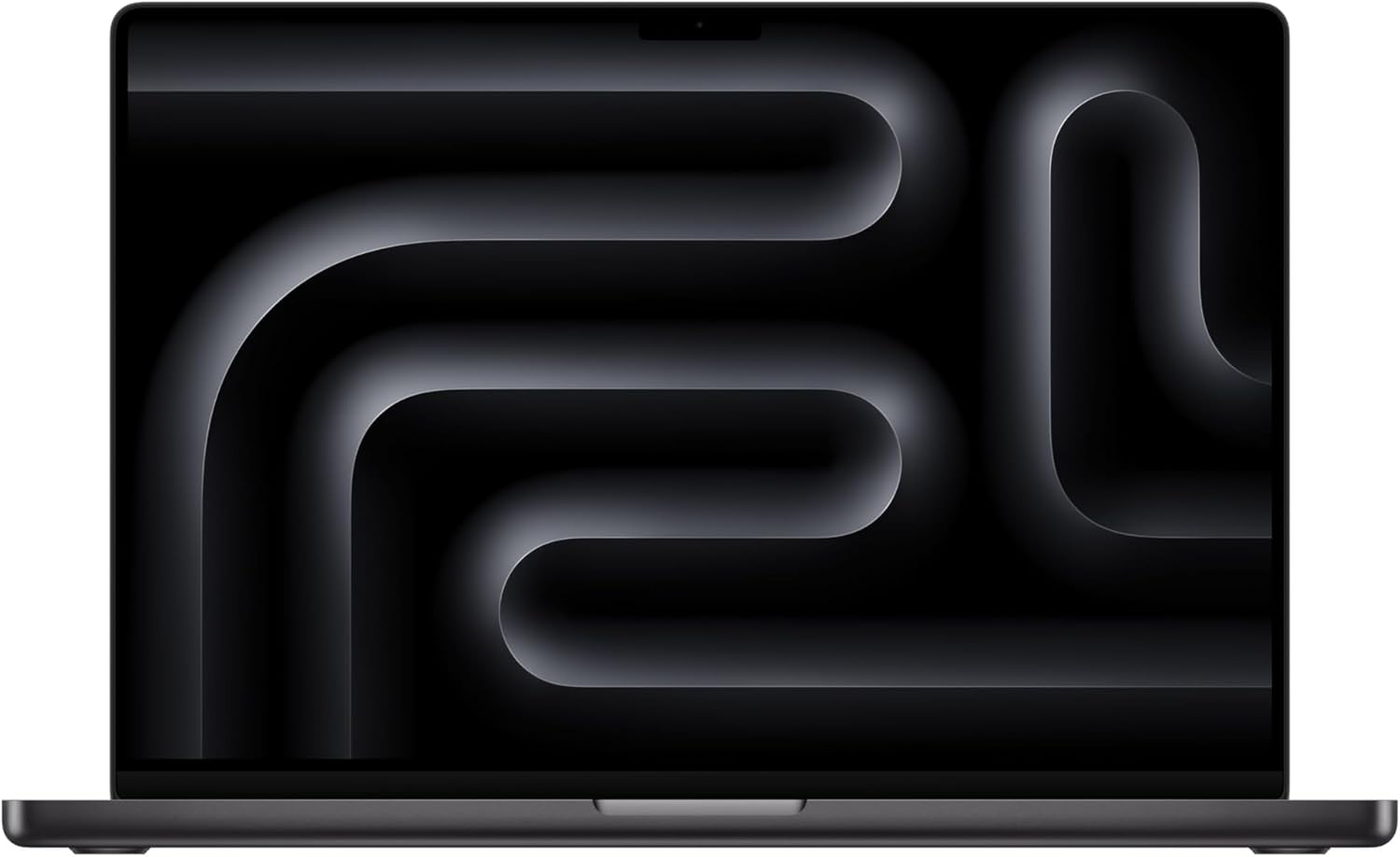
Why we selected it: It’s Apple’s most powerful current laptop chip tier below Max, pairing an 18-core CPU/20-core GPU with 24GB of memory and a large 16.2-inch XDR display.
Who it’s for: Professional video editors, 3D artists, and power users running the most demanding creative and technical workloads.
Who should avoid it: Casual users and most students — this laptop’s price and capability far exceed everyday needs.
Pros: Most powerful chip in this list (M5 Pro), 24GB unified memory for heavy multitasking, Large 16.2-inch Liquid Retina XDR display, Longest battery life among MacBook Pro models.
Cons: Most expensive laptop in this comparison, Overkill and heavy for everyday or student use, Smallest review base of any model here.
Important specs: M5 Pro chip (18-core CPU/20-core GPU) · 16.2-inch Liquid Retina XDR display · 24GB unified memory · 1TB SSD.
What type of buyer should choose it: Professionals whose daily work genuinely requires top-tier sustained CPU/GPU performance.
How to Pick Between These Five
If you want the safest, most-proven MacBook, the base M4 MacBook Air has the deepest review history and the highest rating of any model here, at the lowest price. If you want the newest chip and don’t mind paying more, the M5 Air (13-inch or 15-inch) is the upgrade path. If your work genuinely taxes the CPU/GPU for extended periods — video editing, 3D rendering, heavy coding — the MacBook Pro’s active cooling keeps performance from throttling the way the fanless Air can. And if you need the most power available, the 16-inch M5 Pro is Apple’s current high end.
What to Consider Before Buying a MacBook
Most everyday tasks — browsing, writing, spreadsheets, streaming — run smoothly on any MacBook here, including the cheapest M4 Air. What actually separates the tiers is sustained performance under heavy load: the fanless Air throttles during long, intensive tasks, while the Pro’s active cooling does not. Unified memory (16GB vs. 24GB) affects how many demanding apps you can run at once, and storage can’t be upgraded after purchase, so plan ahead if you store a lot of media locally. Finally, weigh review volume alongside rating — a 4.7 rating on 138 reviews carries more uncertainty than a 4.8 rating on nearly 5,800.
Related Guides
Ugo Daniel researches, compares, and writes the buying guides on Wallstores, cross-checking manufacturer specs, verified pricing, and real customer feedback across tech, home, fitness, and pet categories. He’s personally bought and used many of the kitchen appliances featured on the site, and draws on that firsthand experience in those reviews.