How We Choose the Products We Recommend
We don’t have a warehouse full of gear to physically put through its paces — what we do instead is disciplined research. For every guide, we start with the manufacturer’s published specifications and compare them directly against competing models in the same price range. We track real, current pricing across retailers, not list prices that never actually apply, so the numbers in our comparisons reflect what you’d actually pay today. And we read, in bulk, through verified customer reviews and independent expert coverage for each product, looking for recurring complaints, common praise, and the patterns a single glossy product page won’t tell you.
Where we’ve personally bought and used a product ourselves — currently true for many of the kitchen items we cover — we say so directly in the review, and that firsthand experience shapes what we highlight. For everything else, our pros-and-cons calls come from that cross-referenced research process, not a single source or a rewritten spec sheet. We revisit guides periodically as prices shift and new models launch, and we link to multiple retailers where possible so you’re not stuck with just one option.

Ugo Daniel researches, compares, and writes the buying guides on Wallstores, cross-checking manufacturer specs, verified pricing, and real customer feedback across tech, home, fitness, and pet categories. He’s personally bought and used many of the kitchen appliances featured on the site, and draws on that firsthand experience in those reviews.
Last updated: September 2026 · Written by Ugo Daniel, founder of Wallstores
Gaming laptops in 2026 range from around $1,100 budget models to $3,500+ flagship machines, and the spec sheet differences between them aren’t always obvious at a glance. This guide walks through what actually matters before you buy — GPU generation, RAM, display, and build quality — with current, verified examples at each price tier so you know exactly what your money buys.
How we research this guide: every price, rating, and review count below comes directly from each product’s live Amazon listing at the time of writing. We don’t accept free review units from these brands — this is a comparison of verified specs and real buyer feedback, not a hands-on test.

1. GPU: The Single Biggest Factor
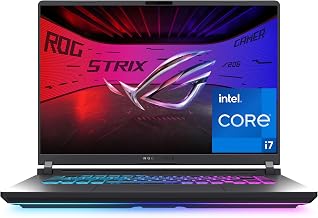
The GPU determines what games you can run and at what settings more than any other spec. In 2026, you’ll see everything from previous-gen RTX 3050/4050 cards in budget laptops (like the HP Victus and ASUS TUF Gaming F16) up to current-gen RTX 5060/5070 Ti cards in mid-range and flagship machines (like the ASUS ROG Strix G16 and Razer Blade 16). A newer-generation GPU, even at a similar model number, generally outperforms an older one in current titles.
2. RAM: 16GB vs 32GB
16GB is the practical minimum for gaming in 2026, but 32GB (found on laptops like the Acer Nitro V 16S) gives real headroom for streaming, Discord, and background apps running alongside your game without stutters. If you only ever play one game at a time with nothing else open, 16GB is fine; if you multitask heavily, the extra RAM is worth prioritizing over some other specs.
3. CPU: Balance With the GPU
A powerful GPU paired with a weak CPU creates a bottleneck, especially in CPU-heavy games (strategy titles, simulation games, some competitive shooters). Current-gen Intel Core i7/Ultra 9 or AMD Ryzen 7 chips are a good match for RTX 5060-and-above GPUs; don’t overspend on the GPU tier if the CPU can’t keep up.

4. Display: Resolution, Refresh Rate, and Panel Type
Refresh rate (144Hz-240Hz) matters most for competitive/fast-paced games; resolution (FHD vs QHD+) affects visual clarity and how hard your GPU has to work. OLED panels, found on premium machines like the Razer Blade 16, offer better contrast and color than standard IPS panels, but add significant cost. For most gamers, a 144-165Hz FHD+/WUXGA panel is the practical sweet spot.

5. Screen Size and Portability
15-16 inch laptops balance portability and screen real estate; 17-inch models (like the MSI Cyborg 17) trade portability for a larger display, and tend to be heavier and bulkier to carry around. If you’ll mostly use the laptop at a desk, the larger screen is a clear upside; if you travel with it often, a 15-16 inch model will be easier to live with.
6. Storage
1TB SSD is becoming the standard at $1,200+; budget models sometimes ship with 512GB, which fills up quickly with modern game installs (many AAA titles now exceed 100GB). If your budget model has a smaller SSD, factor in the cost of an upgrade or plan to manage storage more actively.
7. Budget vs Premium: What You’re Actually Paying For
Going from a $1,150 laptop to a $1,500 one typically buys you a GPU generation bump and more RAM. Going from $1,500 to $3,500+ (like the Razer Blade 16) buys you the top GPU tier, an OLED display, and premium build materials — but with diminishing returns for most gamers who aren’t running the most demanding titles at maximum settings.
What to Consider Before Buying: Quick Checklist
Who it’s for: First-time gaming laptop buyers and anyone upgrading who wants a clear framework instead of comparing spec sheets from scratch.
Who should look elsewhere: Buyers who already know their budget and priorities — jump straight to our Best Gaming Laptops Under $1,500 roundup instead.
Pros of buying based on this framework: Avoids overpaying for specs you won’t use, Helps you spot real bottlenecks (like pairing a strong GPU with a weak CPU), Matches the laptop to how you’ll actually use it (desk vs. travel).
Cons/tradeoffs to accept: There’s no single “best” gaming laptop — it depends on your budget and use case, Higher-tier specs come with real, sometimes steep, price jumps.
Related Guides
Ugo Daniel researches, compares, and writes the buying guides on Wallstores, cross-checking manufacturer specs, verified pricing, and real customer feedback across tech, home, fitness, and pet categories. He’s personally bought and used many of the kitchen appliances featured on the site, and draws on that firsthand experience in those reviews.