


Replacement Voice Remote Control Compatible with Onn TV FHD 4K UHD Streaming Box 100024646 100026240 4k Pro 4K Plus
$11.99
Price: $11.99
(as of Jun 04, 2026 11:33:39 UTC – Details)
Product description




NPTwarcot remote compatible with Onn FHD/4K/4K PRO/4K PLUS Streaming Device(Box) models: 100024646 100026240 100135769 28078468 Not compatible with TCL TVs !
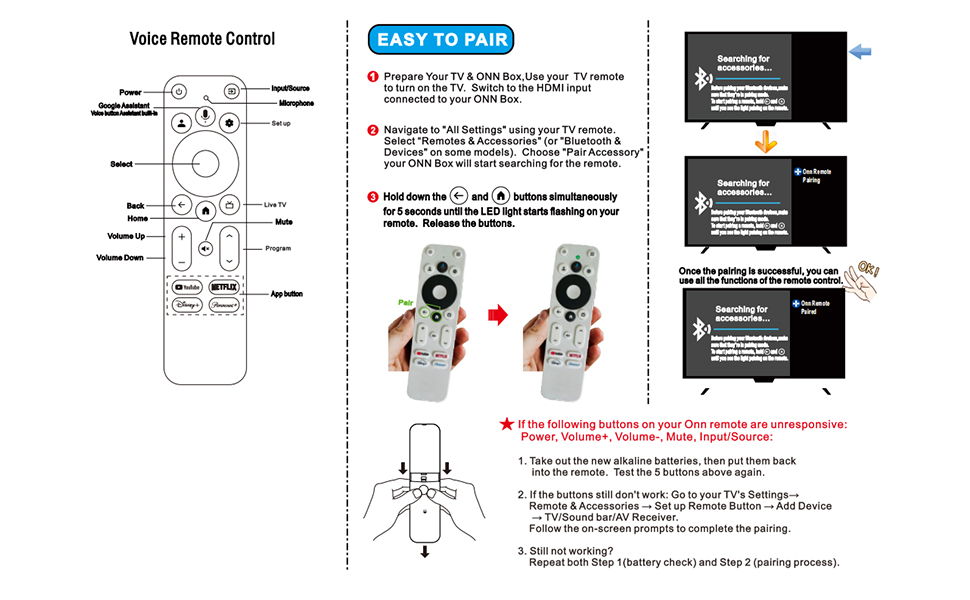
Please first use the TV remote control to turn on the TV, find Settings, select Remote Control Settings, and after the TV displays the remote control name, press the pairing button on the substitute remote control to complete the pairing with the TV. If the substitute remote control cannot turn off the TV, please use the substitute remote control to find the TV settings, remote control settings, remote control button settings, find the corresponding TV brand, and let the substitute remote control learn the button functions of the TV remote control. This will enable the substitute remote control to turn off the TV power.
1.Cannot be used simultaneously with the original remote control. 2.If the device prompts to upgrade your software, please turn off the upgrade button for streaming media. 3.If the new remote control cannot be used, please try turning on the Bluetooth function of your phone and connecting it to the remote control for testing, The remote control name is “onn remote”,After connecting, if you can easily control your phone, please open the TV settings, add a new remote control, disconnect the original remote control, and you can start using it.
100024646 100026240 28078468 100135769 If you cannot remotely control your TV, you can open “Settings”→”Set Remote Control Button”→”Add Device” and select the TV. If it can automatically recognize your TV, you do not need to operate it. If recognition fails, manually select your brand and model.
if you’re having issues connecting to the TV/streaming box, make sure it’s set in pairing mode and then on the remote hold the home and back arrow down until the light flashed.
If the following buttons (Power, Volume+, Volume-, Mute, InputSource)on your remote are unresponsive: Take out the new alkaline batteries, then put them back into the remote. Test the 5 buttons above again.If the buttons still don’t work: Go to your TV’s Settings -Remote and Accessories – Set up Remote Button – Add Device – TV/Sound bar/AV Receiver Follow the on-screen prompts to complete the pairing
The replacement remote will is compatible with Onn 4k Pro
The replacement remote isn’t compatible with the following models 100005395 100005396 100005397 100005842 100005843 100005844 100007147 100012584 100012585 100012586 100012587 100012588 100012589 100012590 100018971 100021261 100024699 100044717
Please don’t use rechargeable batteries.




-430x484.jpg)